
NetSupport has released an updated version of NetSupport Notify to address the below vulnerability reports raised. We would like to thank the Security researcher, Chris Leech, for bringing these threats to our attention and for allowing us the time to build a fix and notify our customers.
- CVE-2025-34179: Information disclosure via unauthenticated SQL injection
- CVE-2025-34180: Weak password encoding
- CVE-2025-34181: Remote code execution via arbitrary file upload
A solution for each of these reports has been included in NetSupport Notify 5.11.0001 released on 15th Dec 2025.
To protect your NetSupport Notify installation against the above, we recommend performing the following actions:
- Step 1 – Update your NetSupport Notify Notification Servers, Consoles and Agents to version 5.11.0001.
When the different components of NetSupport Notify are updated, the Gateway key will be automatically updated and stored using the industry standard AES encryption algorithm. - Step 2 – Update any AD or Intune Policies that may be applying earlier encrypted variants of your NetSupport Notify Gateway Keys.
This article explains how to perform each of the above to secure your NetSupport Notify installation.
IMPORTANT: If you believe you may have a compromised NetSupport Notify Gateway Key then we recommend adding a new key to your NetSupport Notify Server after updating your installation and then migrating all NetSupport Notify Agents and Controls to the new key. If you need any assistance on this process, please contact NetSupport Technical Support.
Upgrade the NetSupport Notify components
The updated version for NetSupport Notify 5.11.0001 that includes the solution to all 3 of the vulnerabilities raised is available for download from our website at http://www.netsupportnotify.com/downloads Alternatively, if you have registered on the My Support area, you can log in and download from here https://support.netsupportsoftware.com/
The below outlines the procedures available to update the different NetSupport Notify components.
Upgrading the NetSupport Notify Server
We recommend updating your NetSupport Notify Server component first to version 5.11.0001.
Note : If you are also using a shared NetSupport Manager Gateway with NetSupport Notify, there is no requirement to install NetSupport Notify after updating to the 14.12.0001.
For standalone NetSupport Notify Server environments to perform the update you will need to ensure that you have the required NetSupport Notify installer files ready, this will include the below:
- Setup.exe – NetSupport Notify full installer file for version 5.11.0001.
- NSN.lic – Your version 5.11 NetSupport Notify License file will be required.
Please place these files in the same folder location on the Notify Server. Next follow the steps below to start the NetSupport Notify installation over the top of the existing NetSupport Notify Gateway.
- Click Next on the Welcome Screen
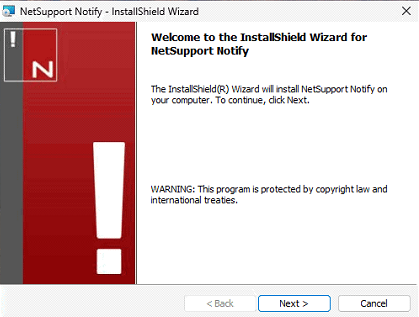
- This will detect the previously installed components, click Next to continue

- Click Install to start the installation

- The installation of the new Gateway version will commence

- Click Finish to complete the installation step

Upgrading the NetSupport Notify Agents
To perform the update of the NetSupport Notify Agents you will need to ensure that you have the required NetSupport Notify installer files ready, this will include the below:
- Setup.exe or NetSupport Notify.msi – NetSupport Notify full installer file for version 5.11.0001.
- NSN.lic – Your version 5.11 NetSupport Notify License file will be required.
- Config.dat – The Agent configuration.
- NSN.ini –The Install parameters file (used for automated installs to set which NetSupport Notify components to install, check this is configured to install the required components i.e Agent component).
Please place these files in the same folder location. There are then different methods available to update your NetSupport Notify Agent installations, the method chosen may depend on the initial deployment method used to install the Console onto your devices. Available options include
- Local installation
- Active Directory Group Policy Deployment
- Intune Deployment
- NetSupport Notify Deploy tool
- Deployment via other 3rd party deploy tools
Please find links to resources below to assist with updating the NetSupport Notify Agents.
Intune Deployment: https://kb.netsupportsoftware.com/knowledge-base/deploying-netsupport-products-via-microsoft-intune
Active Directory Group Policy Deployment: https://kb.netsupportsoftware.com/knowledge-base/installing-netsupport-notify-via-active-directory-group-policy/
Local installation: https://resources.netsupportsoftware.com/resources/manualpdfs/nsn_manual.pdf
Upgrading the NetSupport Notify Console
To perform the update of the NetSupport Notify Agents you will need to ensure that you have the required NetSupport Notify installer files ready, this will include the below:
- Setup.exe or NetSupport Notify.msi – NetSupport Notify full installer file for version 5.11.0001.
- NSN.lic – Your version 5.11 NetSupport Notify License file will be required.
- NSN.ini – The Install parameters file (used for automated installs to set which NetSupport Notify components to install, check this is configured to install the required components i.e Console).
Please place these files in the same folder location. There are then different methods available to update your NetSupport Notify Console installations, the method chosen may depend on the initial deployment method used to install the Console onto your devices.
Available options include
- Local installation
- Active Directory Group Policy Deployment
- Intune Deployment
- NetSupport Notify Deploy tool
- Deployment via other 3rd party deploy tools
Intune Deployment: https://kb.netsupportsoftware.com/knowledge-base/deploying-netsupport-products-via-microsoft-intune
Active Directory Group Policy Deployment: https://kb.netsupportsoftware.com/knowledge-base/installing-netsupport-notify-via-active-directory-group-policy/
Local installation: https://resources.netsupportsoftware.com/resources/manualpdfs/nsn_manual.pdf
Updating the encrypted Gateway Key values assigned to Console and Agents via Policy
As well as locally configuring the Notify Server connection details to the NetSupport Notify Console and Agents, it’s possible to also assign the Notify Server connections to both Console and Agent devices using the supplied ADM or ADMX template files. If you were previously assigning the NetSupport Notify Server connection details via Active Directory or Intune Policy after the update of NetSupport Notify to 5.11.0001 it will be required to update any Console and Agent Policies to the new AES encrypted value for the Gateway Key.
IMPORTANT: When applying the encrypted Gateway Key value via Policy to your machines ensure the value is generated using the latest Encryption utility provided upon request from the NetSupport Technical Support team. This will ensure that the value applied to your NetSupport Notify Consoles and Agents are using the AES encryption level.
Updating the Notify Server Key applied to the Console via Policy
Within Active Directory Group Policy Management Console or Intune Policies locate the previous policy assigning the Notify Server Connections to your Consoles and choose to edit the Policy.
- Active Directory Policy location
Each Notify Server connection assigned to the NetSupport Notify Console via the Active Directory Group Policy Management Console will be located from:
Administrative Templates > NetSupport Notify Console Settings > Console Configuration > Notify Server Connections

- Intune Policy location
Each Notify Server connection assigned to the NetSupport Notify Console via Intune Policies will be located from:
Computer Configuration/\/NetSupport Notify Console settings/\/Console Configuration/\/Notify Server connections

Within this section of the AD or Intune policy management will find a list of Notification Server Connections assigned. For any that are enabled and assigning the previous encrypted value for the Gateway key, edit these policies and replace them with the new AES encrypted version of the Gateway Key.
The AES encrypted version of the Gateway key for the Notify Console can be generated using the the latest encryption tool. The latest encryption tool can be requested from the NetSupport Support Team.
Updating the Notify Server Key applied to the Agents via Policy
Within your Active Directory Group Policy Management Console or Intune Policies locate the previous policy assigning the Notify Server Connections details and edit the Policy.
- Active Directory Policy location
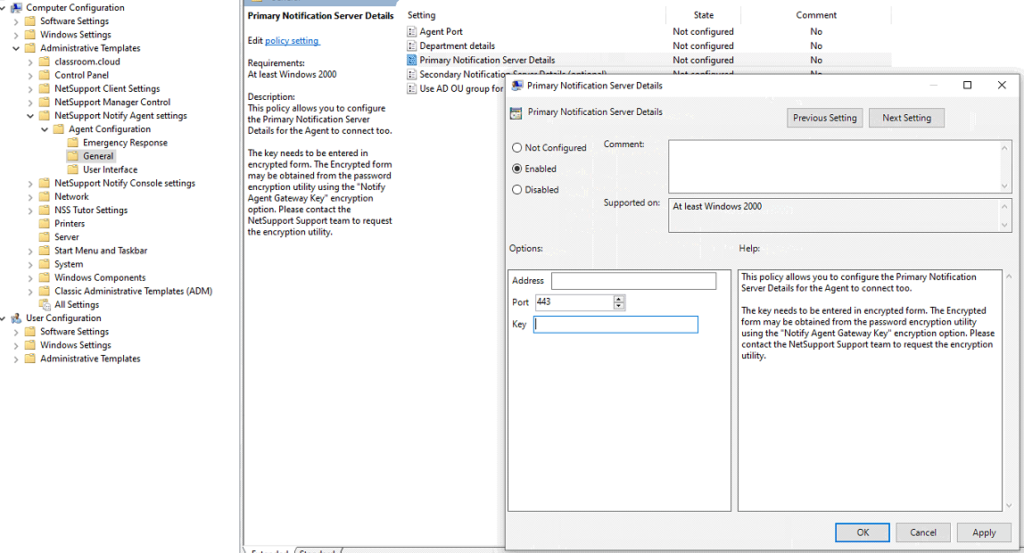
The Gateway connection assigned to the NetSupport Notify Agent via the Active Directory Group Policy Management Console will be located from:
Administrative Templates > NetSupport Notify Agent Settings > General > Primary Notification Server Details
- Intune Policy location
The Gateway connection assigned to the NetSupport Notify Agent via Intune Policy Management will be located from
 Computer Configuration/\/NetSupport Notify Agent Settings/\/General/\/Connectivity/\/Transports
Within this section of the AD or Intune policy management locate the policy named Primary Notification Server Details and edit this policy. Replace the encrypted key with the new AES version of the Gateway Key within the policy.
The AES encrypted version of the Gateway key for the Notify Agent can be generated using the the latest encryption tool. The latest encryption tool can be requested from the NetSupport Support Team.