
Skip to main content
If you experience a TRANS_KEY_MISSING message in the classroom.cloud Web Portal, this may be due to an issue with data cached by your browser for the website. To resolve this, you can clear the cache only for the classroom.cloud website.
We recommend following these steps:
- Open the browser (Edge or Chrome).
- Log in to classroom.cloud and navigate to the area of the Web Portal where the TRANS_KEY_MISSING message appears.
- Press the F12 key to launch Dev Tools.
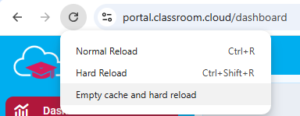
- Right-click the Refresh icon in the address bar.
- Select Empty cache and hard reload.
- Return to the classroom.cloud Web Portal and the TRANS_KEY_MISSING message will now be resolved.