
Skip to main content
This article explains how to prevent a specific device group from being used when creating new classes in classroom.cloud.
This setting is useful for device groups that should never be used to start classroom sessions, such as staff devices, administration computers, reception PCs, library workstations or IT support devices.
Requirements
To configure this setting, you must be signed in to the classroom.cloud Web Portal with Organisation Admin or Site Admin permissions.
Configuring the device group
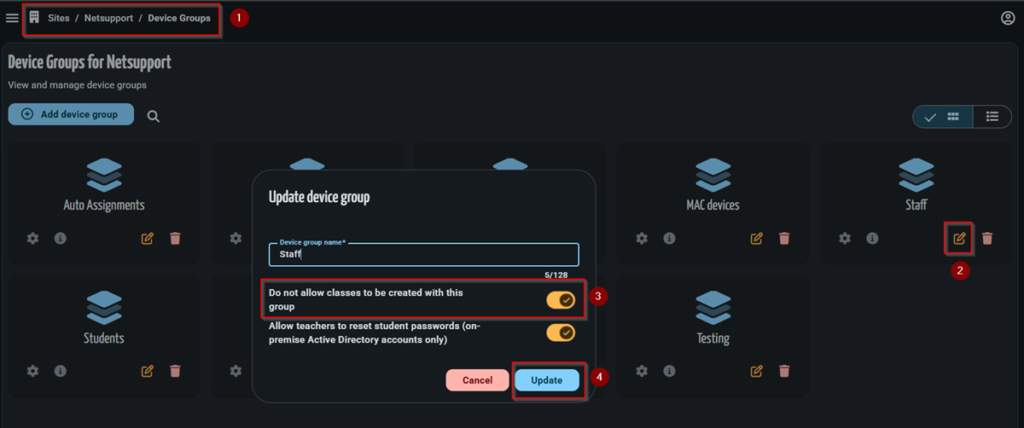
- Sign in to the classroom.cloud Web Portal.
- Navigate to Sites > [Site Name] > Device Groups.
- Locate the required device group and select Edit.
- Enable Do not allow classes to be created with this group.
- Click Update to save the changes.
How the setting works
After this option has been enabled:
- The device group is no longer available when creating a new class using the Device Group connection method from My Classes or Class Management.
- This setting applies to the device group rather than individual devices.
- Existing classes that already use the device group continue to operate normally and are not affected.
- If the setting is disabled later, the device group immediately becomes available again for creating new classes.