
Skip to main content
Administrators can prevent live device thumbnails from being displayed in the Tech Console for selected device groups. This setting is useful for devices used by staff or departments that handle confidential information, helping to improve user privacy when devices are viewed in the Tech Console.
Configure the setting
To configure this setting, you must be signed in to the classroom.cloud Web Portal with Organisation Admin or Site Admin permissions.
- Sign in to the classroom.cloud Web Portal.
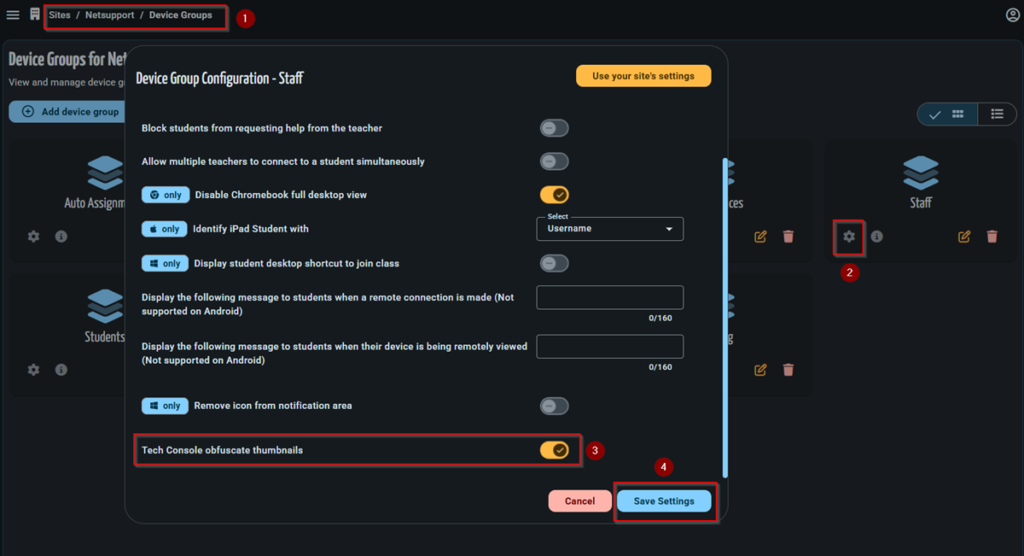
- Navigate to Sites > [Site Name] > Device Groups.
- Select the required device group and click the Settings icon.
- Enable Tech Console obfuscate thumbnails.
- Click Save Settings.
Result
After the setting has been enabled:
- Devices within the configured device group no longer display live desktop thumbnails in the Tech Console.
- The setting applies only to the selected device group.
- Device thumbnails for all other device groups remain unchanged.