
Skip to main content
All previously sent messages displayed in the Recent Notifications window and in the History section of the Notification Console are stored in a database file on the Notification Server machine.
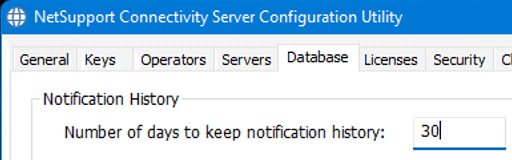
By default, the retention period for messages is set to 30 days. After this time, the messages are permanently deleted from the database file and are no longer seen in the Notification Console.
However, if you wish to keep the messages for longer than 30 days, you can alter the retention period by changing a setting in the NetSupport Connectivity Server Configuration Console.
Notification Server
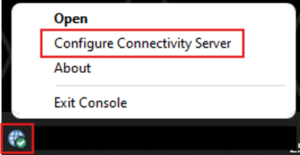
- Locate the grey globe NetSupport Connectivity Server Console icon in the system tray.
- Right-click the icon and select Configure Connectivity Server.
- Select the Database tab and enter the number of days you wish to keep the messages in the database file.
- Click Apply, then OK to use the new history retention setting
Note: Setting the value to 0 (zero) means that the previously sent messages are never automatically deleted from the NetSupport Notify database file.